Artificial intelligence is rapidly transforming how videos are created, edited, and produced online. What once required professional cameras, actors, expensive editing software, and hours of production can now be generated using simple text prompts. Best AI Video Generators are now being used by creators, filmmakers, startups, marketers, and businesses to produce high-quality content faster than ever before.
Whether you want to create cinematic scenes, social media videos, marketing ads, animated stories, or YouTube content, AI tools can dramatically simplify the process.
But with dozens of AI video platforms appearing every year, a common question users ask is:
What are the Best AI Video Generators available today?
In this comprehensive guide, we compare the most powerful AI video generation tools currently available and explain which one is best depending on your needs.
This guide covers:
-
The best AI video generators available today
-
Real comparisons between leading AI video tools
-
Which tools are best for creators, marketers, and filmmakers
-
How AI video generation works
-
The future of AI video creation
Best AI Video Generators (Quick Answer)
If you’re looking for the best AI video generators right now, here is a quick overview of the top tools: • Runway – Best overall AI video generator for cinematic video production and YouTube content. • Kling – Best AI video generator for realistic motion, physics simulation, and lifelike environments. • Pika – Best AI video generator for short-form social media content like TikTok, Instagram, and reels. • Higgsfield – Best AI video generator for AI storytelling, creative filmmaking, and narrative content. Each platform focuses on different strengths, so the best AI video generator depends on your use case, workflow, and creative goals. You can also explore hundreds of AI tools in our AI Tools Directory here.What Is an AI Video Generator?
An AI video generator is a tool that uses artificial intelligence models to automatically create video content from prompts, images, or scripts.
Instead of manually filming scenes or editing clips, users can generate videos using simple inputs such as:
-
text prompts
-
images
-
scripts
-
voice narration
AI models analyze the input and produce video frames, motion, lighting, and animation automatically.
Modern AI video tools can generate:
-
cinematic scenes
-
animated characters
-
realistic environments
-
motion graphics
-
social media videos
-
marketing content
These technologies are rapidly becoming a major part of modern content production.
Quick Comparison of the Best AI Video Generators
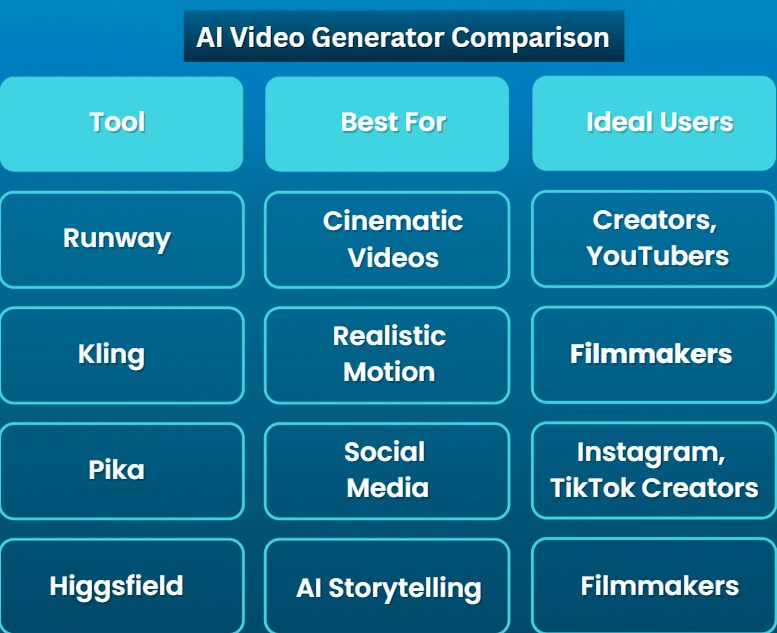
| Tool | Best For | Key Strength |
|---|---|---|
| Runway | Filmmakers & creators | Cinematic control |
| Kling | Realistic motion | Physics simulation |
| Pika | Social media creators | Fast generation |
| Higgsfield | AI storytelling | Creator workflow |
Each platform focuses on slightly different capabilities, which is why choosing the right one depends on the type of content you want to create.
Best AI Video Generators Compared (Quick Verdict)
Based on current capabilities, performance, and creative control, the following platforms represent the most powerful AI video generators available today.Best AI Video Generator Overall: Runway Best for Realistic Video: Kling Best for Social Media: Pika Best for AI Filmmaking: Higgsfield Best AI video generator for YouTube → Runway Best AI video generator for TikTok → Pika Best AI video generator for realistic scenes → Kling Best AI video generator for storytelling → Higgsfield
1. Runway
Runway is one of the most advanced AI creative platforms available today. It offers powerful tools for video generation, editing, and visual effects, making it popular among filmmakers and creators.
The platform’s Gen-3 video model allows users to generate cinematic scenes with camera motion, lighting effects, and complex environments.
Runway is widely used for:
-
AI filmmaking
-
marketing videos
-
creative storytelling
-
experimental visual projects
Key Features
-
text-to-video generation
-
advanced editing tools
-
cinematic camera motion
-
AI visual effects
Pros
-
powerful creative control
-
high-quality visual output
-
strong ecosystem for creators
Cons
-
higher pricing compared to some tools
-
learning curve for beginners
Runway is best suited for creators who want professional-quality AI video production.
2. Kling AI
Kling AI has gained attention for producing extremely realistic AI-generated motion and environments. The platform focuses heavily on natural movement, physics simulation, and scene realism.
This makes Kling particularly impressive when generating videos with:
-
human motion
-
environmental physics
-
realistic lighting
Key Features
-
highly realistic motion generation
-
long video clips
-
detailed scene environments
Pros
-
extremely realistic visuals
-
strong motion simulation
-
impressive environmental details
Cons
-
generation times can be slower
-
limited access in some regions
Kling is ideal for users who want the most realistic AI-generated video scenes available today.
3. Pika
Pika is designed to make AI video generation simple and accessible for creators.
Instead of focusing heavily on complex cinematic control, Pika prioritizes speed and ease of use, making it popular among social media creators.
Pika is commonly used to create:
-
short videos
-
reels and TikTok content
-
quick visual concepts
-
animated scenes
Key Features
-
fast video generation
-
simple interface
-
prompt-based animation
Pros
-
very easy to use
-
fast results
-
great for social content
Cons
-
less control compared to advanced tools
Pika is best for creators who want to generate videos quickly for social platforms.
4. Higgsfield
Higgsfield focuses on storytelling and creator-friendly workflows.
The platform is designed for creators who want to experiment with AI-generated narratives and cinematic sequences.
Instead of just generating clips, Higgsfield aims to make AI video creation part of a full creative storytelling process.
Key Features
-
AI storytelling tools
-
cinematic visual generation
-
creator-focused interface
Pros
-
strong storytelling capabilities
-
modern user interface
-
designed for creators
Cons
-
smaller ecosystem compared to some competitors
Higgsfield is particularly interesting for AI filmmakers and narrative creators.
| Tool | Realism | Ease of Use | Best For |
|---|
| Runway | ⭐⭐⭐⭐ | ⭐⭐⭐ | filmmakers |
| Kling | ⭐⭐⭐⭐⭐ | ⭐⭐ | realistic scenes |
| Pika | ⭐⭐⭐ | ⭐⭐⭐⭐⭐ | social media |
| Higgsfield | ⭐⭐⭐⭐ | ⭐⭐⭐ | storytelling |
Emerging AI Video Technologies
(Next Generation AI Video Models)
While the tools above are currently the most widely used, new AI video models are emerging rapidly.
Two notable technologies shaping the future include:
These next-generation models aim to push AI video generation even further by improving:
-
cinematic realism
-
scene consistency
-
video length
-
prompt accuracy
As these models become more widely available, the capabilities of AI video tools will continue expanding.
Best AI Video Generator for Different Use Cases
Different creators have different needs. The best AI video tool depends largely on what you want to produce.
| Use Case | Recommended Tool |
|---|---|
| YouTube videos | Runway |
| Social media content | Pika |
| Realistic cinematic scenes | Kling |
| AI storytelling | Higgsfield |
Understanding the strengths of each tool can help you choose the right platform for your workflow.
Example AI Video Prompt
AI video generators typically work by converting prompts into visual scenes.
Example prompt:
A cinematic aerial drone shot of a futuristic city at sunset with glowing neon lights reflecting on wet streets, dramatic lighting, ultra realistic atmosphere.
The AI model interprets this description and generates the video frames automatically.
The Future of AI Video Creation
AI video technology is advancing rapidly.
In the near future we can expect:
-
longer AI-generated video sequences
-
improved character consistency
-
realistic human motion
-
AI-generated films and series
AI tools are likely to become an essential part of modern content production across industries such as marketing, entertainment, education, and social media.
Creators who learn these tools early will have a major advantage as the technology continues evolving.
AI Video Generator Workflow for Creators
Many creators wonder how to actually use AI video generators in a real production workflow. In practice, most creators combine multiple tools to produce professional content efficiently.
A typical AI video creation workflow looks like this:
Step 1: Idea and Script
Start by defining the concept of the video.
Creators usually begin with:
-
a story idea
-
marketing message
-
YouTube video concept
-
educational script
AI writing tools can help generate scripts quickly.
Step 2: Generate Video Scenes with AI
Next, creators use AI video generators to create the visual scenes.
Popular tools for this step include:
-
Runway AI
-
Kling AI
-
Pika Labs
-
Higgsfield
These platforms can generate video scenes from simple prompts or images.
For example, creators may generate:
-
futuristic city shots
-
animated characters
-
cinematic landscapes
-
social media visuals
This step dramatically reduces traditional production costs.
Step 3: Add Voice and Audio
Once the video scenes are generated, creators typically add:
-
voice narration
-
background music
-
sound effects
AI voice tools can generate natural-sounding narration without recording equipment.
Step 4: Final Editing
The final step is editing and assembling the video.
Creators often combine AI video clips with editing tools to:
-
adjust pacing
-
add subtitles
-
improve transitions
-
polish the final output
This workflow allows creators to produce videos significantly faster than traditional production methods.
Best AI Video Prompt Ideas
Many users search for AI video prompts when using video generators. Below are examples of prompts creators can experiment with.
These prompts work well with most AI video generators.
Cinematic Prompts
-
A futuristic cyberpunk city at night with flying vehicles and neon lights
-
A cinematic drone shot of a tropical island at sunset
-
A spaceship flying through an asteroid field in deep space
Nature Prompts
-
A peaceful forest with sunlight shining through tall trees
-
A dramatic waterfall in a mountain valley during sunrise
-
A cinematic aerial shot of a snowy mountain landscape
Storytelling Prompts
-
A mysterious traveler walking through an ancient desert city
-
A futuristic robot exploring an abandoned space station
-
A fantasy village glowing with magical lights at night
Social Media Prompts
-
A vibrant city street filled with colorful neon lights
-
A modern office environment with futuristic technology
-
A stylish product showcase with dramatic lighting
Common Mistakes When Using AI Video Generators
Although AI video tools are powerful, beginners often encounter challenges when creating their first videos.
Avoiding these common mistakes can significantly improve results.
Using Vague Prompts
AI models work best with detailed prompts.
Instead of writing:
city at night
Try writing:
a futuristic city skyline at night with glowing neon lights and flying vehicles.
Detailed prompts help the AI produce more accurate scenes.
Expecting Perfect Results Immediately
AI video generation often requires experimentation.
Creators usually generate several variations before selecting the best result.
Ignoring Video Composition
Even with AI tools, basic filmmaking principles still matter.
Consider:
-
camera angle
-
lighting
-
scene composition
These factors help produce more visually appealing videos.
Overusing Effects
Sometimes creators add too many visual effects, which can make videos look chaotic.
Simple and clean visuals often produce better results.
Best AI Video Generators for Different Industries
AI video tools are now used across many industries. Different sectors use these technologies in different ways.
AI Video Generators for Marketing
Businesses use AI video tools to create:
-
promotional videos
-
product demonstrations
-
social media ads
-
explainer videos
AI tools allow marketing teams to test multiple creative concepts quickly.
AI Video Generators for Education
Educational creators use AI video generation for:
-
online courses
-
visual learning content
-
animated explanations
-
science and history videos
AI tools help educators produce engaging visual content without expensive production equipment.
AI Video Generators for Startups
Startups often use AI video tools to create:
-
pitch videos
-
product demos
-
website explainer videos
-
marketing campaigns
AI-generated videos can dramatically reduce early marketing costs.
Why AI Video Generators Are Exploding in Popularity
The rapid growth of AI video generators is driven by several factors.
Rising Demand for Video Content
Video has become the most dominant form of online content.
Platforms like YouTube, TikTok, Instagram, and LinkedIn prioritize video content heavily.
Lower Production Costs
Traditional video production can require expensive equipment, studios, and editing teams.
AI tools allow creators to produce videos with far fewer resources.
Faster Content Creation
AI tools allow creators to produce content significantly faster, enabling faster experimentation and iteration.
Creative Possibilities
AI video generation enables creators to produce scenes that would normally require complex production setups.
This opens new possibilities for storytelling and digital media creation.
Popular AI Video Generator Searches
Best AI video generator
AI text to video generator
Free AI video generator
AI video generator for YouTube
AI video generator for TikTok
AI video generator from text
Realistic AI video generator
AI video generator for marketing
🚀 The Future of AI Workflows
Artificial intelligence is transforming how we work, create, and solve problems. From video generation to automation and research, AI tools are becoming essential in modern workflows.
By experimenting with these tools today, creators and professionals can stay ahead of the next wave of innovation.
Let’s continue exploring how AI can help build smarter workflows, faster creativity, and more powerful ideas.
If you found this guide helpful, consider sharing it with other creators exploring AI video tools.
Final Conclusion
AI video generators are rapidly transforming how visual content is created across industries.
Platforms like Runway, Kling, Pika, and Higgsfield are pushing the boundaries of what artificial intelligence can produce in video generation.
From social media creators to filmmakers and businesses, AI video tools are making high-quality content production more accessible than ever before.
As these technologies continue evolving, AI-generated video will likely become a standard tool in the modern creative workflow.
Creators who learn how to use these tools today will be well positioned to take advantage of the next wave of AI-powered content creation.
Final Thoughts
AI video generators are rapidly changing how visual content is created.
Tools like Runway, Kling, Pika, and Higgsfield are already enabling creators to produce videos that would have previously required entire production teams.
As artificial intelligence continues improving, AI video creation will likely become a standard part of content production workflows.
For creators, businesses, and innovators, learning these tools today can open up entirely new possibilities for storytelling, marketing, and digital media creation.
Frequently Asked Questions
What is the best AI video generator?
Some of the best AI video generators currently available include Runway, Kling, Pika, and Higgsfield. Each platform offers different strengths depending on the type of video you want to create.
Can AI generate full videos?
Yes. Modern AI models can generate complete video clips including environments, motion, lighting, and animation from simple prompts.
Which AI video generator is best for YouTube creators?
Runway is currently one of the most popular tools for YouTube creators because it offers strong cinematic control and editing capabilities.
Are AI video generators free?
Many AI video tools offer limited free plans or trial versions, but advanced features typically require paid subscriptions.
What’s Next?
AI video generation is evolving rapidly, and new tools and capabilities are emerging every month. Whether you’re a creator, developer, marketer, or entrepreneur, learning how to use AI tools effectively can unlock entirely new possibilities for content creation and productivity.
Do you use AI video generators in your workflow?
We’d love to hear your experience.
Share your favorite AI tools, prompts, or creative workflows in the comments and help other creators discover new ideas.
📩 Stay Updated with AI Trends
Artificial intelligence is moving fast, and staying informed can give you a major advantage.
Subscribe to our newsletter to receive:
-
the latest AI tools and releases
-
practical AI tutorials and guides
-
emerging trends in AI technology
-
curated resources for creators and developers
🚀 Stay Ahead with AI Insights
Join OfficialAI and get the latest AI tools, trends and practical insights delivered to your inbox.
By subscribing, you agree to receive email updates from OfficialAI. You can unsubscribe anytime.
🔎 Explore the AI Tools Directory
Looking for more AI tools to improve your workflow?
Explore our AI Tools Directory, where we curate hundreds of powerful AI tools designed to help with:
-
productivity
-
creativity
-
automation
-
content creation
Discover the best AI tools here:
https://tools.officialai.io
📚 Related Guide
If you’re exploring how AI can enhance everyday work and learning, you may also find this guide helpful:
Best AI Tools for Students, Developers, and Creators
If you’re interested in comparing major AI chatbots, read our detailed comparison, you can also read our detailed comparison of the most popular AI chatbots:ChatGPT vs Claude vs Gemini
https://officialai.io/chatgpt-vs-claude-vs-gemini/