 Looking for practical AI tools you can actually use daily? This guide covers the most useful AI assistants, coding tools, content generators, and automation platforms available today — explained in simple terms.
What Are AI Tools?
AI tools are software applications that use artificial intelligence to help users perform tasks faster and with less manual effort. They can assist with writing, coding, research, design, automation, communication, and decision-making. Instead of replacing skills, AI tools enhance productivity by reducing repetitive work and helping people focus on creative and problem-solving activities.
Best AI Tools That Actually Save Time & Make You Productive
Artificial Intelligence is no longer a futuristic concept.
It has quietly become the new electricity of work.
In 2024, people were experimenting with AI.
In 2025, companies started depending on AI.
In 2026, individuals who don’t use AI are already falling behind — not because they are less skilled, but because they are working without leverage.
The biggest misconception about AI tools is this:
AI does not replace people.
AI replaces manual effort.
The right AI tools don’t make you lazy.
They make you faster, calmer, and more creative.
This guide is not a random list from the internet.
These are tools actually being used daily by developers, creators, writers, students, founders, and professionals.
Let’s start with the tools that changed how people work.
Writing, Thinking & Daily Work Assistants
1. ChatGPT
The most widely used AI assistant in the world.
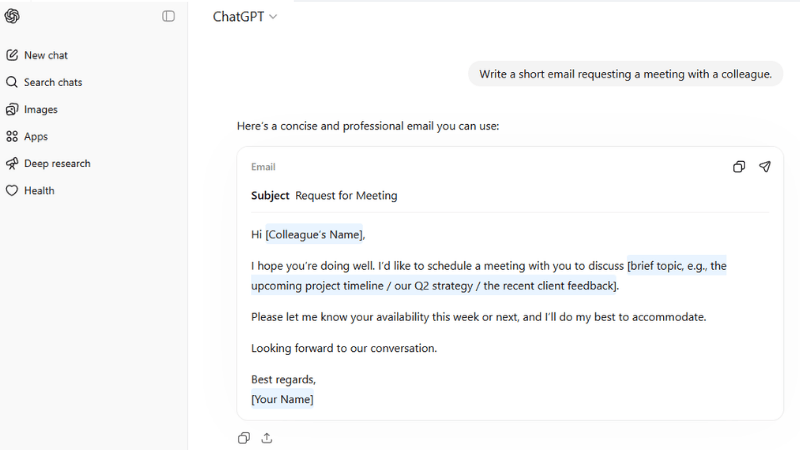
People use it for:
-
writing emails
-
debugging code
-
research
-
brainstorming ideas
-
learning new skills
The real power of ChatGPT is not automation — it is clarity.
It helps you think faster.
2. Claude
Claude is known for calmer, more structured responses.
It is extremely good for:
-
summarizing long documents
-
analysing PDFs
-
business writing
-
structured planning
Many professionals prefer Claude for deep reading and analysis.
3. Gemini
Google’s AI assistant integrates with Gmail, Docs, and Drive.
This changes productivity dramatically because your AI can:
-
read your documents
-
summarise meetings
-
write drafts inside Google Docs
Instead of switching apps, AI works inside your daily workflow.
4. Notion AI
Notion was already a powerful productivity app.
Notion AI turned it into a second brain.
You can:
-
generate meeting notes
-
auto-summarise projects
-
convert ideas into tasks
-
organise knowledge automatically
For students and planners, this is one of the most practical AI tools available.
5. Perplexity AI
Perplexity is an AI search engine.
Instead of searching Google and opening 10 links, it gives:
-
direct answers
-
cited sources
-
research summaries
It is especially powerful for learning new topics quickly.
AI Tools for Content Creation & Media
6. Midjourney
One of the most advanced image generation tools.
Used by:
-
designers
-
YouTubers
-
filmmakers
-
storytellers
It can create cinematic posters, characters, and concept art within seconds.
7. Leonardo AI
A creator-friendly alternative to Midjourney.
Popular for:
-
game assets
-
characters
-
consistent styles
-
thumbnails
Many small creators prefer Leonardo because it is easier to control.
8. Runway
Runway changed video creation.
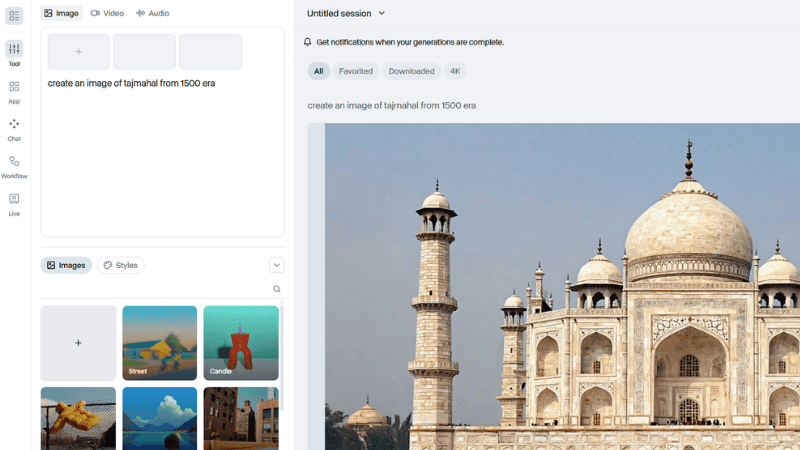
You can:
-
remove background from video
-
edit footage using text
-
generate shots using AI
It is being used by short-film creators and social media editors.
9. Pika
Pika converts images into moving videos.
Creators use it to:
-
animate photos
-
create short scenes
-
build visual stories
This is especially useful for reels and short-form storytelling.
10. ElevenLabs
One of the most realistic AI voice tools.
You can generate:
-
narrations
-
characters
-
audiobooks
-
YouTube voiceovers
Many YouTube channels already use AI narration — often you cannot even tell.
AI Coding & Developer Tools
11. GitHub Copilot
Copilot writes code while you type.
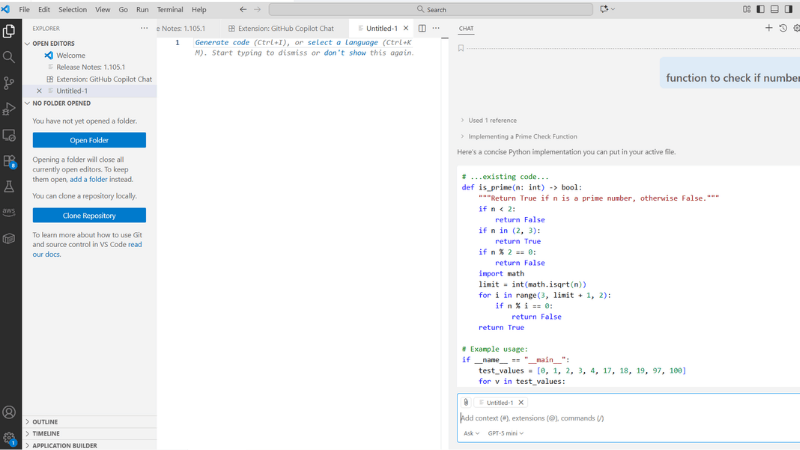
Developers use it to:
-
autocomplete functions
-
understand unfamiliar code
-
speed up development
It doesn’t replace developers.
It removes repetitive coding.
12. Cursor
Cursor is an AI-first code editor.
You can:
-
ask questions about your codebase
-
refactor files
-
debug faster
It feels like having a senior developer sitting beside you.
13. Replit AI
Replit allows coding directly in the browser with AI assistance.
Beginners especially benefit because:
-
setup is automatic
-
AI explains errors
-
projects run instantly
This lowers the barrier to learning programming.
AI Productivity & Automation
14. Zapier AI
Zapier connects apps automatically.
Example: A new email → create a task → send Slack notification → update spreadsheet.
Now AI can build these workflows for you using plain English.
15. Make (Integromat)
A more visual automation platform.
You can design complex workflows across services:
-
websites
-
CRMs
-
email platforms
-
databases
It’s widely used by startups and solo founders.
16. Otter AI
Otter records and transcribes meetings automatically.
Very useful for:
-
remote teams
-
students
-
interviews
-
lectures
You never need to manually write meeting notes again.
AI Tools for Video & Presentations
17. Descript
Descript edits video like a document.
You delete words in text → video edits automatically.
It also supports:
-
screen recording
-
podcasts
-
subtitles
-
voice cloning
A major time saver for creators.
18. Synthesia
Create videos with AI presenters.
Used for:
-
training videos
-
tutorials
-
product demos
Companies now create entire courses without filming.
19. Canva AI
Canva integrated AI across design tools.
You can:
-
generate graphics
-
remove background
-
write copy
-
design presentations
For non-designers, this is incredibly powerful.
AI Research, Learning & Knowledge
20. Elicit
An academic research assistant.
It helps:
-
find research papers
-
summarise studies
-
extract insights
Students and researchers save hours using it.
21. Wolfram Alpha AI
Combines AI with computational mathematics.
Useful for:
-
equations
-
data analysis
-
scientific explanations
Especially helpful for STEM students.
22. Consensus
Search scientific research and get conclusions instead of opinions.
Great for evidence-based learning.
AI Business & Marketing Tools
23. Jasper AI
A marketing-focused AI writer.
Businesses use it for:
-
ads
-
landing pages
-
social media posts
-
email campaigns
24. Copy.ai
Helps generate marketing content quickly.
Popular among startups and small businesses.
25. Tidio AI (Lyro)
AI chatbot for websites.
It can:
-
answer customer questions
-
support visitors
-
improve conversions
Many online stores now run customer support 24/7 using AI.
Frequently Asked Questions
What are AI tools used for?
AI tools help users perform tasks faster by automating writing, coding, research, design, and communication. They assist with repetitive work and allow people to focus on creative and problem-solving activities.
Are AI tools free to use?
Many AI tools offer free versions or trial plans. Tools like ChatGPT, Gemini, and Canva AI provide free access with optional paid upgrades for advanced features.
Which AI tool is best for beginners?
ChatGPT and Notion AI are considered beginner-friendly because they use simple natural language prompts and require no technical knowledge.
Do AI tools replace human jobs?
AI tools usually do not replace people directly. Instead, they change how work is done by increasing productivity. People who learn to use AI tools effectively often become more valuable in their roles.
Final Thoughts
AI tools are not about replacing skill.
They are about removing friction.
A designer still needs taste.
A developer still needs logic.
A creator still needs ideas.
But AI removes:
-
repetitive typing
-
blank page anxiety
-
manual busywork
The future will not belong to people who “know AI”.
The future will belong to people who work together with AI.
Start small.
Pick 2–3 tools from this list.
Use them daily for a week.
You will not go back.
What’s Next?
💬 Do you use AI in your Production workflows? Share your thoughts in the comments!
📢 Subscribe to our newsletter for the latest AI tools, updates, and practical AI guide.
🚀 Stay Ahead with AI Insights
Join OfficialAI and get the latest AI tools, trends and practical insights delivered to your inbox.
By subscribing, you agree to receive email updates from OfficialAI. You can unsubscribe anytime.
🔗 Check out our AI Tools Directory and database here.
🔗 If you’re interested in comparing major AI chatbots, read our detailed comparison, you can also read our detailed comparison of the most popular AI chatbots: ChatGPT vs Claude vs Gemini
ChatGPT vs Claude vs Gemini: Which AI Model Is Actually the Best Right Now?
🔗 If you’re exploring the best AI video generators for creators, filmmakers, or social media content, this guide may help:
Best AI Video Generators Right Now: Runway vs Kling vs Pika vs Higgsfield🤝 Let’s explore how AI can improve everyday productivity and creativity together and make our daily production workflows efficient.